
Note
Go to the end to download the full example code.
Exploring learner activity sequences#
Scenario: You have interaction logs from a Moodle LMS and want to understand how learners engage with course material.
Concepts covered:
Load an event log with
access()Detect learning sessions from inactivity gaps
Build a
StateSequencePoolwithbuild_states()Filter sequences by length with
LengthCriterionVisualise action distributions, timelines, and state distributions
Imports#
import random

import pandas as pd
import polars as pl

from tanat import build_states
from tanat.criterion import LengthCriterion
from tanat.dataset import access
from tanat.visualization import SequenceVisualizer
Load and prepare the event log#
access() returns the MOOC dataset as a pandas
DataFrame. Each row is a single learner interaction recorded by a Moodle
LMS (~100 k events, ~118 learners).
df = access("mooc_events")
print(f"{len(df)} events  ·  {df['user'].nunique()} learners")
df.head()
mooc_events.csv:   0%|          | 0.00/14.6M [00:00<?, ?B/s]
mooc_events.csv:   1%|          | 98.3k/14.6M [00:00<00:37, 386kB/s]
mooc_events.csv:   1%|          | 180k/14.6M [00:00<00:29, 490kB/s]
mooc_events.csv:   2%|▏         | 254k/14.6M [00:00<00:27, 513kB/s]
mooc_events.csv:   2%|▏         | 319k/14.6M [00:00<00:27, 512kB/s]
mooc_events.csv:   3%|▎         | 418k/14.6M [00:00<00:23, 594kB/s]
mooc_events.csv:   3%|▎         | 500k/14.6M [00:00<00:23, 609kB/s]
mooc_events.csv:   4%|▍         | 598k/14.6M [00:01<00:21, 661kB/s]
mooc_events.csv:   5%|▍         | 672k/14.6M [00:01<00:22, 628kB/s]
mooc_events.csv:   5%|▌         | 737k/14.6M [00:01<00:23, 579kB/s]
mooc_events.csv:   6%|▌         | 803k/14.6M [00:01<00:24, 552kB/s]
mooc_events.csv:   6%|▌         | 860k/14.6M [00:01<00:27, 508kB/s]
mooc_events.csv:   6%|▋         | 918k/14.6M [00:01<00:28, 484kB/s]
mooc_events.csv:   7%|▋         | 1.01M/14.6M [00:01<00:24, 550kB/s]
mooc_events.csv:   7%|▋         | 1.07M/14.6M [00:01<00:25, 538kB/s]
mooc_events.csv:   8%|▊         | 1.16M/14.6M [00:02<00:22, 588kB/s]
mooc_events.csv:   8%|▊         | 1.23M/14.6M [00:02<00:23, 564kB/s]
mooc_events.csv:   9%|▉         | 1.34M/14.6M [00:02<00:20, 646kB/s]
mooc_events.csv:  10%|▉         | 1.40M/14.6M [00:02<00:21, 607kB/s]
mooc_events.csv:  10%|█         | 1.52M/14.6M [00:02<00:18, 695kB/s]
mooc_events.csv:  11%|█         | 1.63M/14.6M [00:02<00:17, 739kB/s]
mooc_events.csv:  12%|█▏        | 1.73M/14.6M [00:02<00:17, 743kB/s]
mooc_events.csv:  13%|█▎        | 1.83M/14.6M [00:02<00:16, 753kB/s]
mooc_events.csv:  13%|█▎        | 1.91M/14.6M [00:03<00:17, 709kB/s]
mooc_events.csv:  14%|█▎        | 1.99M/14.6M [00:03<00:18, 663kB/s]
mooc_events.csv:  14%|█▍        | 2.06M/14.6M [00:03<00:19, 635kB/s]
mooc_events.csv:  15%|█▍        | 2.14M/14.6M [00:03<00:20, 606kB/s]
mooc_events.csv:  15%|█▌        | 2.24M/14.6M [00:03<00:18, 650kB/s]
mooc_events.csv:  16%|█▌        | 2.32M/14.6M [00:03<00:19, 634kB/s]
mooc_events.csv:  16%|█▋        | 2.38M/14.6M [00:03<00:20, 599kB/s]
mooc_events.csv:  17%|█▋        | 2.48M/14.6M [00:04<00:18, 650kB/s]
mooc_events.csv:  18%|█▊        | 2.58M/14.6M [00:04<00:17, 685kB/s]
mooc_events.csv:  18%|█▊        | 2.66M/14.6M [00:04<00:17, 673kB/s]
mooc_events.csv:  19%|█▉        | 2.76M/14.6M [00:04<00:16, 701kB/s]
mooc_events.csv:  20%|█▉        | 2.88M/14.6M [00:04<00:16, 695kB/s]
mooc_events.csv:  21%|██        | 2.99M/14.6M [00:04<00:15, 753kB/s]
mooc_events.csv:  21%|██        | 3.07M/14.6M [00:04<00:16, 718kB/s]
mooc_events.csv:  22%|██▏       | 3.15M/14.6M [00:04<00:16, 673kB/s]
mooc_events.csv:  22%|██▏       | 3.22M/14.6M [00:05<00:17, 646kB/s]
mooc_events.csv:  23%|██▎       | 3.32M/14.6M [00:05<00:17, 651kB/s]
mooc_events.csv:  23%|██▎       | 3.40M/14.6M [00:05<00:17, 648kB/s]
mooc_events.csv:  24%|██▍       | 3.48M/14.6M [00:05<00:17, 646kB/s]
mooc_events.csv:  24%|██▍       | 3.57M/14.6M [00:05<00:17, 640kB/s]
mooc_events.csv:  25%|██▍       | 3.64M/14.6M [00:05<00:18, 601kB/s]
mooc_events.csv:  26%|██▌       | 3.74M/14.6M [00:05<00:16, 668kB/s]
mooc_events.csv:  26%|██▌       | 3.82M/14.6M [00:06<00:16, 639kB/s]
mooc_events.csv:  27%|██▋       | 3.89M/14.6M [00:06<00:17, 621kB/s]
mooc_events.csv:  27%|██▋       | 3.96M/14.6M [00:06<00:18, 583kB/s]
mooc_events.csv:  28%|██▊       | 4.02M/14.6M [00:06<00:20, 527kB/s]
mooc_events.csv:  28%|██▊       | 4.09M/14.6M [00:06<00:21, 492kB/s]
mooc_events.csv:  29%|██▉       | 4.20M/14.6M [00:06<00:17, 604kB/s]
mooc_events.csv:  29%|██▉       | 4.28M/14.6M [00:06<00:17, 572kB/s]
mooc_events.csv:  30%|███       | 4.40M/14.6M [00:07<00:15, 662kB/s]
mooc_events.csv:  31%|███       | 4.47M/14.6M [00:07<00:15, 638kB/s]
mooc_events.csv:  31%|███▏      | 4.58M/14.6M [00:07<00:14, 694kB/s]
mooc_events.csv:  32%|███▏      | 4.65M/14.6M [00:07<00:15, 659kB/s]
mooc_events.csv:  32%|███▏      | 4.73M/14.6M [00:07<00:15, 636kB/s]
mooc_events.csv:  33%|███▎      | 4.83M/14.6M [00:07<00:14, 669kB/s]
mooc_events.csv:  34%|███▍      | 4.94M/14.6M [00:07<00:13, 738kB/s]
mooc_events.csv:  34%|███▍      | 5.02M/14.6M [00:07<00:13, 693kB/s]
mooc_events.csv:  35%|███▍      | 5.10M/14.6M [00:08<00:15, 628kB/s]
mooc_events.csv:  35%|███▌      | 5.16M/14.6M [00:08<00:16, 565kB/s]
mooc_events.csv:  36%|███▌      | 5.23M/14.6M [00:08<00:16, 554kB/s]
mooc_events.csv:  36%|███▌      | 5.28M/14.6M [00:08<00:17, 523kB/s]
mooc_events.csv:  37%|███▋      | 5.34M/14.6M [00:08<00:18, 502kB/s]
mooc_events.csv:  37%|███▋      | 5.41M/14.6M [00:08<00:18, 506kB/s]
mooc_events.csv:  38%|███▊      | 5.49M/14.6M [00:08<00:16, 537kB/s]
mooc_events.csv:  38%|███▊      | 5.55M/14.6M [00:09<00:17, 529kB/s]
mooc_events.csv:  39%|███▊      | 5.62M/14.6M [00:09<00:17, 521kB/s]
mooc_events.csv:  39%|███▉      | 5.73M/14.6M [00:09<00:14, 632kB/s]
mooc_events.csv:  40%|████      | 5.85M/14.6M [00:09<00:12, 713kB/s]
mooc_events.csv:  41%|████      | 5.95M/14.6M [00:09<00:12, 688kB/s]
mooc_events.csv:  41%|████▏     | 6.03M/14.6M [00:09<00:12, 667kB/s]
mooc_events.csv:  42%|████▏     | 6.10M/14.6M [00:09<00:13, 639kB/s]
mooc_events.csv:  43%|████▎     | 6.21M/14.6M [00:09<00:12, 690kB/s]
mooc_events.csv:  43%|████▎     | 6.32M/14.6M [00:10<00:10, 753kB/s]
mooc_events.csv:  44%|████▍     | 6.42M/14.6M [00:10<00:10, 742kB/s]
mooc_events.csv:  45%|████▍     | 6.50M/14.6M [00:10<00:11, 713kB/s]
mooc_events.csv:  45%|████▌     | 6.58M/14.6M [00:10<00:11, 670kB/s]
mooc_events.csv:  46%|████▌     | 6.65M/14.6M [00:10<00:12, 626kB/s]
mooc_events.csv:  46%|████▌     | 6.72M/14.6M [00:10<00:13, 592kB/s]
mooc_events.csv:  47%|████▋     | 6.80M/14.6M [00:10<00:12, 603kB/s]
mooc_events.csv:  47%|████▋     | 6.91M/14.6M [00:11<00:11, 692kB/s]
mooc_events.csv:  48%|████▊     | 7.01M/14.6M [00:11<00:11, 659kB/s]
mooc_events.csv:  49%|████▊     | 7.09M/14.6M [00:11<00:12, 618kB/s]
mooc_events.csv:  49%|████▉     | 7.15M/14.6M [00:11<00:12, 587kB/s]
mooc_events.csv:  49%|████▉     | 7.22M/14.6M [00:11<00:13, 554kB/s]
mooc_events.csv:  50%|█████     | 7.31M/14.6M [00:11<00:13, 547kB/s]
mooc_events.csv:  51%|█████     | 7.39M/14.6M [00:11<00:12, 573kB/s]
mooc_events.csv:  52%|█████▏    | 7.52M/14.6M [00:12<00:10, 700kB/s]
mooc_events.csv:  52%|█████▏    | 7.59M/14.6M [00:12<00:10, 663kB/s]
mooc_events.csv:  53%|█████▎    | 7.67M/14.6M [00:12<00:11, 618kB/s]
mooc_events.csv:  53%|█████▎    | 7.75M/14.6M [00:12<00:10, 622kB/s]
mooc_events.csv:  54%|█████▎    | 7.82M/14.6M [00:12<00:11, 580kB/s]
mooc_events.csv:  54%|█████▍    | 7.95M/14.6M [00:12<00:09, 711kB/s]
mooc_events.csv:  55%|█████▍    | 8.02M/14.6M [00:12<00:09, 657kB/s]
mooc_events.csv:  56%|█████▌    | 8.09M/14.6M [00:12<00:10, 632kB/s]
mooc_events.csv:  56%|█████▌    | 8.16M/14.6M [00:13<00:19, 323kB/s]
mooc_events.csv:  56%|█████▋    | 8.21M/14.6M [00:13<00:19, 335kB/s]
mooc_events.csv:  57%|█████▋    | 8.29M/14.6M [00:13<00:15, 399kB/s]
mooc_events.csv:  58%|█████▊    | 8.40M/14.6M [00:13<00:12, 512kB/s]
mooc_events.csv:  58%|█████▊    | 8.49M/14.6M [00:13<00:11, 521kB/s]
mooc_events.csv:  59%|█████▊    | 8.55M/14.6M [00:14<00:11, 511kB/s]
mooc_events.csv:  59%|█████▉    | 8.63M/14.6M [00:14<00:11, 529kB/s]
mooc_events.csv:  60%|█████▉    | 8.70M/14.6M [00:14<00:11, 520kB/s]
mooc_events.csv:  60%|██████    | 8.80M/14.6M [00:14<00:09, 585kB/s]
mooc_events.csv:  61%|██████    | 8.93M/14.6M [00:14<00:08, 702kB/s]
mooc_events.csv:  62%|██████▏   | 9.07M/14.6M [00:14<00:06, 806kB/s]
mooc_events.csv:  63%|██████▎   | 9.16M/14.6M [00:14<00:06, 775kB/s]
mooc_events.csv:  63%|██████▎   | 9.24M/14.6M [00:15<00:07, 736kB/s]
mooc_events.csv:  64%|██████▍   | 9.37M/14.6M [00:15<00:06, 812kB/s]
mooc_events.csv:  65%|██████▌   | 9.50M/14.6M [00:15<00:05, 856kB/s]
mooc_events.csv:  66%|██████▌   | 9.62M/14.6M [00:15<00:05, 866kB/s]
mooc_events.csv:  67%|██████▋   | 9.71M/14.6M [00:15<00:05, 818kB/s]
mooc_events.csv:  67%|██████▋   | 9.79M/14.6M [00:15<00:06, 764kB/s]
mooc_events.csv:  68%|██████▊   | 9.87M/14.6M [00:15<00:06, 721kB/s]
mooc_events.csv:  68%|██████▊   | 9.98M/14.6M [00:15<00:06, 706kB/s]
mooc_events.csv:  69%|██████▉   | 10.1M/14.6M [00:16<00:06, 669kB/s]
mooc_events.csv:  70%|██████▉   | 10.2M/14.6M [00:16<00:05, 777kB/s]
mooc_events.csv:  70%|███████   | 10.3M/14.6M [00:16<00:05, 736kB/s]
mooc_events.csv:  71%|███████▏  | 10.4M/14.6M [00:16<00:05, 820kB/s]
mooc_events.csv:  72%|███████▏  | 10.5M/14.6M [00:16<00:04, 880kB/s]
mooc_events.csv:  73%|███████▎  | 10.6M/14.6M [00:16<00:04, 824kB/s]
mooc_events.csv:  74%|███████▎  | 10.7M/14.6M [00:16<00:04, 863kB/s]
mooc_events.csv:  74%|███████▍  | 10.8M/14.6M [00:17<00:04, 814kB/s]
mooc_events.csv:  75%|███████▍  | 10.9M/14.6M [00:17<00:04, 747kB/s]
mooc_events.csv:  75%|███████▌  | 11.0M/14.6M [00:17<00:05, 715kB/s]
mooc_events.csv:  76%|███████▌  | 11.1M/14.6M [00:17<00:05, 631kB/s]
mooc_events.csv:  76%|███████▋  | 11.1M/14.6M [00:17<00:05, 580kB/s]
mooc_events.csv:  77%|███████▋  | 11.2M/14.6M [00:17<00:06, 545kB/s]
mooc_events.csv:  77%|███████▋  | 11.3M/14.6M [00:17<00:06, 505kB/s]
mooc_events.csv:  78%|███████▊  | 11.3M/14.6M [00:18<00:07, 463kB/s]
mooc_events.csv:  78%|███████▊  | 11.4M/14.6M [00:18<00:06, 477kB/s]
mooc_events.csv:  79%|███████▊  | 11.5M/14.6M [00:18<00:05, 523kB/s]
mooc_events.csv:  80%|███████▉  | 11.6M/14.6M [00:18<00:04, 701kB/s]
mooc_events.csv:  80%|████████  | 11.7M/14.6M [00:18<00:04, 651kB/s]
mooc_events.csv:  81%|████████  | 11.8M/14.6M [00:18<00:03, 798kB/s]
mooc_events.csv:  82%|████████▏ | 11.9M/14.6M [00:18<00:03, 744kB/s]
mooc_events.csv:  83%|████████▎ | 12.1M/14.6M [00:18<00:03, 788kB/s]
mooc_events.csv:  83%|████████▎ | 12.2M/14.6M [00:19<00:03, 770kB/s]
mooc_events.csv:  84%|████████▍ | 12.3M/14.6M [00:19<00:02, 793kB/s]
mooc_events.csv:  85%|████████▍ | 12.4M/14.6M [00:19<00:02, 745kB/s]
mooc_events.csv:  85%|████████▌ | 12.5M/14.6M [00:19<00:02, 712kB/s]
mooc_events.csv:  86%|████████▌ | 12.6M/14.6M [00:19<00:02, 756kB/s]
mooc_events.csv:  87%|████████▋ | 12.7M/14.6M [00:19<00:02, 720kB/s]
mooc_events.csv:  88%|████████▊ | 12.8M/14.6M [00:19<00:02, 798kB/s]
mooc_events.csv:  88%|████████▊ | 12.9M/14.6M [00:20<00:02, 824kB/s]
mooc_events.csv:  89%|████████▉ | 13.0M/14.6M [00:20<00:02, 787kB/s]
mooc_events.csv:  90%|████████▉ | 13.1M/14.6M [00:20<00:02, 743kB/s]
mooc_events.csv:  90%|█████████ | 13.2M/14.6M [00:20<00:02, 710kB/s]
mooc_events.csv:  91%|█████████ | 13.2M/14.6M [00:20<00:02, 671kB/s]
mooc_events.csv:  91%|█████████▏| 13.3M/14.6M [00:20<00:01, 661kB/s]
mooc_events.csv:  92%|█████████▏| 13.4M/14.6M [00:20<00:01, 723kB/s]
mooc_events.csv:  93%|█████████▎| 13.5M/14.6M [00:20<00:01, 727kB/s]
mooc_events.csv:  93%|█████████▎| 13.6M/14.6M [00:21<00:01, 679kB/s]
mooc_events.csv:  94%|█████████▍| 13.7M/14.6M [00:21<00:01, 680kB/s]
mooc_events.csv:  95%|█████████▍| 13.9M/14.6M [00:21<00:00, 795kB/s]
mooc_events.csv:  96%|█████████▌| 13.9M/14.6M [00:21<00:00, 746kB/s]
mooc_events.csv:  96%|█████████▌| 14.0M/14.6M [00:21<00:00, 715kB/s]
mooc_events.csv:  97%|█████████▋| 14.1M/14.6M [00:21<00:00, 676kB/s]
mooc_events.csv:  97%|█████████▋| 14.2M/14.6M [00:21<00:00, 646kB/s]
mooc_events.csv:  98%|█████████▊| 14.2M/14.6M [00:22<00:00, 579kB/s]
mooc_events.csv:  98%|█████████▊| 14.3M/14.6M [00:22<00:00, 596kB/s]
mooc_events.csv:  99%|█████████▊| 14.4M/14.6M [00:22<00:00, 609kB/s]
mooc_events.csv:  99%|█████████▉| 14.5M/14.6M [00:22<00:00, 615kB/s]
mooc_events.csv: 100%|█████████▉| 14.6M/14.6M [00:22<00:00, 614kB/s]
mooc_events.csv: 100%|██████████| 14.6M/14.6M [00:22<00:00, 647kB/s]
95626 events  ·  130 learners
Step 1: Session detection#
Learning sessions are not labelled in the log. We define a session as a continuous period of activity: a new session begins when the same learner is idle for more than 2 hours, or when a different user appears.
Each session receives a unique integer id that will serve as the sequence identifier in TanaT.
INACTIVITY = pd.Timedelta("2h")

df["timecreated"] = pd.to_datetime(df["timecreated"])
df = df.sort_values(["user", "timecreated"])
df["session"] = (
    (df["user"] != df["user"].shift()) | (df["timecreated"].diff() > INACTIVITY)
).cumsum()

print(f"Detected {df['session'].nunique()} sessions")
Detected 5700 sessions
Static table: one row per session with the learner identifier.
sessions = df[["user", "session"]].drop_duplicates()
Step 2: Build the sequence pool#
Each session becomes one sequence. We use
build_states() with a within-session position index
as the time axis (0 = first event, 1 = second, …). This abstracts away
calendar time and focuses on the order of actions.
The sessions table (one row per session) is passed as static_data
so the learner identifier is attached to each sequence.
# Add a within-session position index.
df["position"] = df.groupby("session").cumcount()

pool = build_states(
    df[["session", "position", "Action"]],
    id_column="session",
    start_column="position",
    static_data=sessions,
    store_name="mooc_sessions_store",
)
# ``pl.Categorical`` enables consistent colour-coding across visualisations
# and is required by the metric module.
pool.cast_features({"Action": pl.Categorical}, is_static=False)
┌─ State SequenceStore
│
│ Step 1/4: Sorting & preparing data
│
│ Step 2/4: Building sequence index
│
│ Step 3/4: Writing entity, time index & static features
│
│ Step 4/4: Computing & writing metadata
│
└─ Done (5,700 sequences · 95,626 entities · 0.02s)
print(pool)
┌────────────────────────────────────────────────┐
│           StateSequencePool Summary            │
└────────────────────────────────────────────────┘

Overview
─────────────────────────
  Sequences          5,700
  Store              /home/runner/.tanat_workspace/building_pools_tutorial/mooc_sessions_store
  id_column          session

Time Index
─────────────────────────
  Type               Int64 (Timestep) [0 → 152]
  Columns            ['position', 'end']
  t0                 position=0, anchor=start

Entity Features (1)
─────────────────────────
  • Action              Categorical (12 categories)

Static Features (1)
─────────────────────────
  • user                String [len 9 → 9]
Step 3: Filter by length#
The session length distribution is skewed: some outlier sessions contain hundreds of events. We keep sessions with 2 to 40 actions, which covers the majority of learners while removing single-click noise and unrealistically long sessions.
ids_keep = pool.which(LengthCriterion(ge=2, le=40))
pool_filtered = pool.subset(ids_keep)
[which] LengthCriterion → 5,150 / 5,700 IDs (90.4%)
print(pool_filtered)
┌────────────────────────────────────────────────┐
│           StateSequencePool Summary            │
└────────────────────────────────────────────────┘

Overview
─────────────────────────
  Sequences          5,150
  Store              /home/runner/.tanat_workspace/building_pools_tutorial/mooc_sessions_store
  id_column          session

Time Index
─────────────────────────
  Type               Int64 (Timestep) [0 → 39]
  Columns            ['position', 'end']
  t0                 position=0, anchor=start

Entity Features (1)
─────────────────────────
  • Action              Categorical (12 categories)

Static Features (1)
─────────────────────────
  • user                String [len 9 → 9]
Step 4: Action distribution#
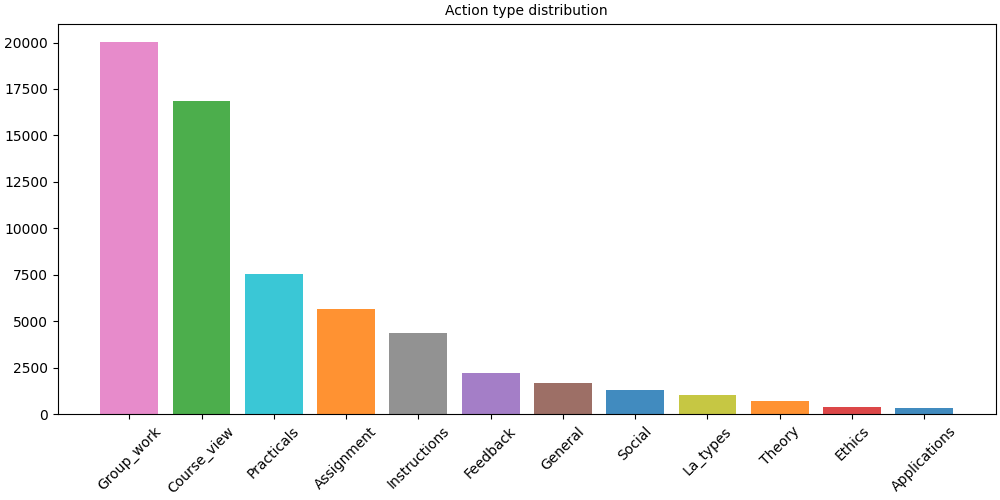
A bar plot shows the frequency of each action type across all sessions, giving a first overview of what learners do most.
# fmt: off
SequenceVisualizer.barplot(sort="descending") \
    .title("Action type distribution") \
    .draw(pool_filtered, entity_feature="Action") \
    .show()
# fmt: on
Step 5: Sample timeline#
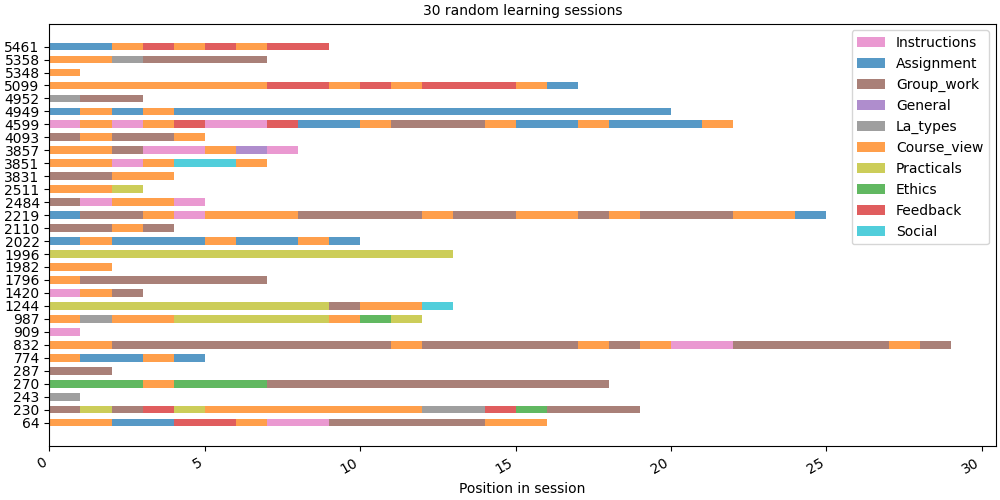
We draw 30 random sessions side by side. Each row is one session; each coloured block is one action at a given position.
random.seed(42)
sample_ids = random.sample(sorted(pool_filtered.unique_ids), 30)
sample = pool_filtered.subset(sample_ids)

# fmt: off
SequenceVisualizer.timeline() \
    .title("30 random learning sessions") \
    .x_axis(label="Position in session") \
    .draw(sample, entity_feature="Action") \
    .show()
# fmt: on
/opt/hostedtoolcache/Python/3.13.15/x64/lib/python3.13/site-packages/tanat_utils/caching/cachable.py:133: UserWarning: 30 row(s) have a null time index (__END__) and will be excluded from the visualisation.
  value = method(self, *args, **kwargs)
Step 6: State distribution over position#
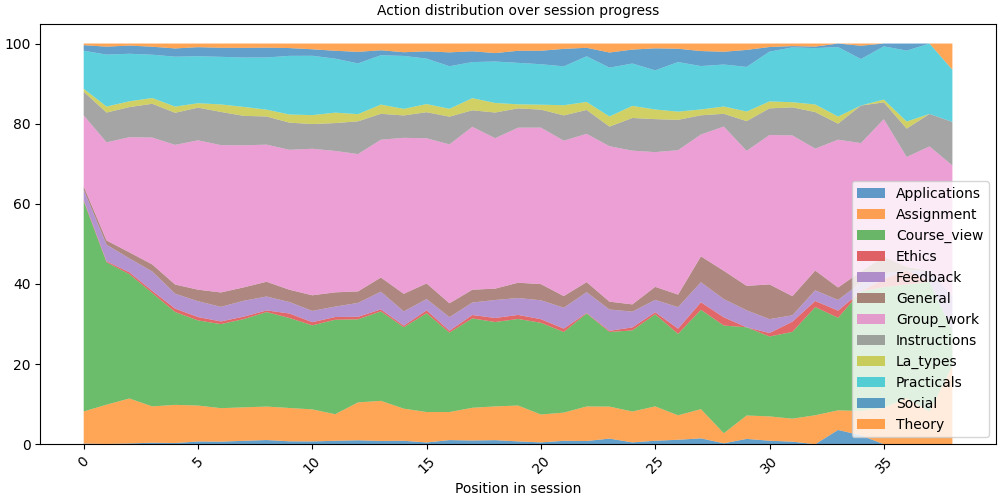
The distribution plot shows how action proportions shift across positions, revealing how learners typically start and end their sessions.
# fmt: off
SequenceVisualizer.distribution(bin_size=1) \
    .title("Action distribution over session progress") \
    .x_axis(label="Position in session") \
    .draw(pool_filtered, entity_feature="Action") \
    .show()
# fmt: on
/opt/hostedtoolcache/Python/3.13.15/x64/lib/python3.13/site-packages/tanat_utils/caching/cachable.py:133: UserWarning: 5150 row(s) have a null time index (__END__) and will be excluded from the visualisation.
  value = method(self, *args, **kwargs)
Total running time of the script: (0 minutes 25.136 seconds)